Getting your wireless karaoke mic set up in minutes is possible even if you’re not skilled with audio equipment. Modern microphones are designed so anyone—kids, beginners, party hosts, and families—can get started quickly. The best part is the freedom wireless systems give you. You’re no longer tied down by messy cords or limited movement. Instead, you can sing, dance, and move around comfortably as you enjoy your favorite karaoke songs.
However, many people get stuck during setup because they assume wireless microphones are complicated. The truth is far simpler. Most systems require only a few basic steps before they’re ready to use. When you understand how the receiver works, what connections to use, and how to adjust sound settings, the entire process flows smoothly. Once everything is paired, your wireless karaoke mic becomes one of the easiest tools to use for parties, gatherings, or casual fun at home.
Let’s walk through how to connect, adjust, troubleshoot, and enhance your wireless microphone so you can start singing within minutes.
Understanding Your Microphone System Before Setup
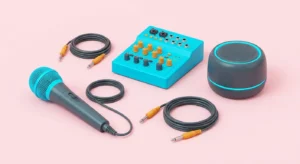
Before you begin pairing anything, it helps to understand what makes a wireless microphone work. Most systems include two main parts: the microphone itself and the receiver. The receiver plugs into your speaker, TV, or karaoke machine and communicates with your mic through radio signals or Bluetooth.
Some microphones rely on UHF channels for stable performance, while others use Bluetooth, which feels more familiar but sometimes introduces slight delays. Knowing which type you own ensures that you connect your system correctly.
You may notice different connection types on your receiver. Common ones include AUX ports, USB connections, RCA cables, and sometimes adapters. Each option helps link your microphone system to your audio source. Checking your available ports beforehand saves you time later.
Once you understand how your microphone communicates and which ports you need, setting up becomes almost effortless.
Connecting Your Microphone to a Speaker
One of the quickest ways to start using your microphone is connecting the receiver directly to a speaker. Most portable speakers, soundbars, or PA speakers include simple input options such as AUX. Plug the receiver into the correct port, turn on your speaker, and then power on your microphone. Many wireless microphones pair automatically when turned on.
If your microphone uses Bluetooth instead of a receiver, connect it through your speaker’s Bluetooth menu. Keep only one device paired at a time because some speakers don’t allow multiple connections. Once paired successfully, test the microphone by speaking into it and adjusting the speaker’s volume until the sound feels comfortable.
This setup is ideal for casual karaoke nights or outdoor gatherings because it keeps everything simple and portable. You get clear sound without additional equipment, and your wireless mic becomes ready for use within moments.
Using Your Mic With a TV or Karaoke Machine
If you want lyrics displayed on a larger screen, connecting your mic through your TV or karaoke machine is another fast option. Begin by plugging the receiver into your karaoke machine or directly into your TV if the ports allow it. Some TVs require an adapter to convert AUX or RCA inputs, so check your equipment beforehand.
Once connected, choose the correct audio input on your TV. After powering on the microphone, check the audio levels in your TV settings or karaoke machine menu. When everything lines up, your TV delivers the visuals while the microphone delivers your voice with clarity.
Bluetooth microphones can also pair with TVs that support Bluetooth audio. Open your TV’s Bluetooth settings, locate your microphone, and pair them. If you notice audio delay, switching to a receiver-based setup usually fixes it.
This method works especially well for family karaoke nights because everyone can see the lyrics clearly while enjoying high-quality sound.
Using Karaoke Apps for a Smooth Singing Experience
Karaoke apps have become one of the easiest ways to host a karaoke night at home. Whether you use a phone, tablet, or smart TV, apps offer instant access to thousands of songs. When paired with a microphone, the experience feels modern and convenient.
To use a wireless microphone with an app, connect the receiver to your speaker first. Then open the app and choose your song. Since the microphone broadcasts audio through the speaker, the app becomes your music and lyric source.
If you want a bigger display, use screen mirroring. AirPlay works for Apple devices, while Chromecast or built-in casting functions work for Android devices and smart TVs. This setup lets you enjoy a full-screen experience while keeping audio routed through your speaker.
Because app-based karaoke updates frequently, you’ll always have fresh songs to choose from. Pairing this with a wireless microphone gives you a complete karaoke system without complicated equipment.
Troubleshooting Common Microphone Issues
Even with simple systems, occasional issues may appear. Fortunately, most problems are easy to fix and won’t slow you down for long. If you hear no sound, check the receiver connection first. Make sure it’s fully plugged in and the correct input is selected on your speaker or TV.
Battery issues are also common. Wireless microphones with low battery power may crackle, lose signal, or cut out mid-performance. Fresh batteries or a full charge solve this problem immediately.
If you hear feedback or buzzing, move away from other electronics, adjust the speaker placement, or lower the volume. Feedback is more likely when the speaker sits directly behind you, so positioning it in front usually fixes the problem.
Bluetooth microphones sometimes disconnect unexpectedly. Restarting both the microphone and the speaker often restores the connection. Reducing the distance between them improves stability as well.
These small adjustments solve most problems in seconds, keeping your karaoke night flowing smoothly.
Simple Ways to Improve Sound Quality
You don’t need professional studio equipment to achieve great sound from your wireless microphone. Small adjustments make a big difference. For example, holding the microphone two inches from your mouth produces clear, crisp sound. If you press the microphone directly against your lips, the sound becomes too loud and distorted.
Many microphones include echo or voice-enhancing features. Experimenting with these settings helps you create a tone you enjoy. A little echo adds depth without sounding artificial.
Speaker placement also matters. Positioning a speaker slightly off-center and in front of you prevents sound loops that cause feedback. You’ll notice instantly when the audio becomes smoother.
These techniques elevate your singing experience without needing advanced skills.
How to Pair Multiple Microphones
If you enjoy duets or singing battles, pairing more than one microphone adds excitement. Many microphone systems include dual channels that allow two microphones to connect to one receiver. When you turn both microphones on, they pair automatically.
If your system doesn’t support dual microphones, you can mix wireless and wired microphones together. This gives you flexibility during parties or group gatherings.
When two microphones interfere with each other, adjusting the channel or frequency usually resolves the issue. Most receivers include simple switches for this purpose. Once both microphones connect clearly, your karaoke night becomes more interactive and enjoyable.
Why Wireless Microphones Make Singing More Fun
Wireless microphones are popular for a reason. Without cords, singers feel free to move, dance, and perform naturally. Children especially love the freedom because it lets them express themselves without tripping over wires. Adults appreciate the clean setup and convenience.
Portability is another major advantage. You can take your microphone anywhere—living rooms, patios, basements, and even on trips. As long as you have a speaker and a receiver, you can sing anywhere. This transforms karaoke into an activity you can start at a moment’s notice.
Wireless microphones keep your space safe too. Without cords stretched across the floor, accidents are far less likely during energetic performances.
Quick Tips for Faster Setup
Setting up your microphone quickly becomes a habit with a few simple practices. Always charge your microphone or keep fresh batteries ready. Turn on your receiver before powering your microphone so pairing happens instantly.
If you use different devices, labeling your adapters saves time. Knowing which adapter belongs to your microphone prevents confusion before parties. Store your system in one location and you’ll always know where everything is.
Start with low volume and increase gradually. This protects your speakers and helps you fine-tune your sound settings. With these habits, setting up your wireless microphone becomes effortless every time.
Conclusion
Setting up your wireless karaoke mic in minutes is entirely achievable once you understand the basics. With simple connections, a quick pairing process, and a few troubleshooting tips, you can enjoy clear sound and a smooth karaoke experience at home. Wireless technology gives you the freedom to move, express yourself, and create memorable moments with family and friends. Once your microphone is ready to use, all that’s left is choosing your favorite song and stepping into the spotlight.
FAQ
- How long does it usually take to set up a wireless karaoke mic?
Most wireless microphones can be set up in one to five minutes once you understand the steps. - Why isn’t my microphone producing sound?
Check your receiver, battery levels, and input settings. One of these is usually the cause. - Can I use two microphones at the same time?
Yes. Many systems support dual microphones, and some allow mixing wired and wireless together. - Does Bluetooth cause delay in singing?
Sometimes. Bluetooth may introduce slight audio lag. UHF microphones usually offer better timing. - Can my microphone connect to any speaker?
Yes, as long as the speaker supports the connection type of your receiver or Bluetooth system.