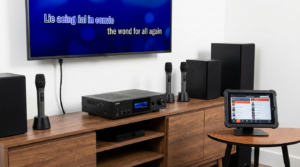
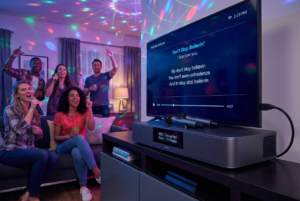
Karaoke used to feel like something reserved for bars, private rooms, or bulky machines with blinking lights. Today, that idea feels outdated. If you have a laptop or PC, you already own the heart of a full karaoke system. The rest is just smart setup and a little patience.
Learning how to set up karaoke at home isn’t about being tech-savvy. It’s about understanding the flow of sound, visuals, and control. Once that clicks, the process feels almost effortless. Suddenly, your computer isn’t just a work tool. It becomes a stage, a DJ booth, and a crowd-pleaser all at once.
Let’s break it down in a way that actually makes sense.
Why Using a Laptop or PC for Karaoke Makes Sense
Choosing to set up karaoke on a laptop or PC gives you flexibility that traditional systems lack.
Unlike fixed karaoke machines, computers let you update software instantly. Song libraries expand endlessly. Streaming platforms, local files, and dedicated apps all work together. That flexibility matters when guests make last-minute requests.
Also, most people already own a computer. That lowers the barrier to entry. Instead of investing in expensive machines, you build a setup piece by piece. Over time, it improves without forcing a large upfront cost.
Most importantly, a computer-based karaoke setup grows with your confidence. You can start simple. Later, you upgrade audio, visuals, or software. The system adapts to you, not the other way around.
What You Need Before You Set Up Karaoke
Before pressing play, take a moment to gather the essentials. Setting up karaoke works best when every piece has a clear role.
You’ll need:
- A laptop or desktop PC with stable performance
- Karaoke software or access to karaoke videos
- A microphone
- Speakers or a sound system
- An internet connection or downloaded songs
That’s the foundation. Everything else builds on it.
Your computer handles playback and visuals. The microphone captures vocals. Speakers project sound. Software ties everything together. When these elements align, karaoke feels smooth instead of frustrating.
Choosing the Right Karaoke Software
Software is the brain of your karaoke setup. Without it, you’re just playing music.
There are two main approaches when you set up karaoke on a laptop or PC. The first uses dedicated karaoke software. The second relies on video platforms with karaoke tracks.
Dedicated karaoke programs offer features like:
- Lyric syncing
- Pitch control
- Song queue management
- Key changes
These tools make hosting easier, especially for groups. Everything stays organized.
On the other hand, video-based karaoke works well for casual use. Karaoke tracks with on-screen lyrics are widely available. This approach requires less setup but offers fewer controls.
Choose based on your goal. If you want structure, go with software. If you want simplicity, videos work fine.
Setting Up Audio the Right Way
Audio is where most karaoke setups fail. That’s also where small improvements make the biggest difference.
Your computer outputs music and lyrics. Your microphone inputs vocals. Both need to meet at the speakers without delay or distortion.
When you set up karaoke, avoid relying on laptop speakers. They’re not designed for live vocals. External speakers create fuller sound and reduce feedback issues.
Connect your microphone properly. USB microphones plug directly into your computer. Analog microphones usually require an audio interface or mixer. USB options are easier for beginners.
Once connected, adjust input levels. If vocals are too quiet, singers strain. If they’re too loud, distortion appears. Aim for balance. Voices should sit comfortably above the music.
Avoiding Audio Lag and Echo
Nothing kills karaoke faster than delay. When singers hear their voice a second late, confidence disappears.
To prevent this, check your audio monitoring settings. Some software allows real-time monitoring with minimal latency. If possible, enable that feature.
Avoid routing audio through unnecessary devices. Each extra connection adds delay. Keep the signal path simple.
Echo can also appear when speakers are too close to microphones. Increase distance. Lower microphone sensitivity. Small changes fix big problems.
When set up correctly, karaoke feels natural. Voices flow with the music instead of fighting it.
Connecting Your Laptop or PC to a Screen
Lyrics need to be visible. Squinting at a laptop screen ruins the mood.
When you set up karaoke, connect your computer to a larger display. TVs work perfectly. Projectors add a dramatic touch. Even a second monitor improves visibility.
Use HDMI when possible. It carries audio and video together, reducing cable clutter. Once connected, duplicate or extend your display so lyrics face the singers.
Position the screen at eye level. When people don’t need to crane their necks, performances improve naturally.
Organizing Songs for Smooth Karaoke Flow
A messy song list creates awkward pauses. Organization keeps energy high.
Create folders or playlists by:
- Genre
- Era
- Energy level
- Language
This structure helps you respond quickly to requests. It also prevents repetitive song choices.
When you set up karaoke software, use the queue feature. Add multiple songs ahead of time. This keeps the night moving without constant interruptions.
Think like a host, not a technician. Flow matters more than perfection.
Using the Internet vs Downloaded Songs
Internet-based karaoke offers variety. Downloaded songs offer reliability.
Streaming karaoke tracks require stable internet. If your connection drops, the party pauses. That risk matters.
Downloaded files eliminate buffering issues. However, they require storage and organization.
Many hosts use a hybrid approach. Popular songs stay downloaded. New requests stream live. This balance provides flexibility without sacrificing reliability.
When you set up karaoke regularly, building a local library saves time and stress.
Microphone Placement and Technique
Even great equipment sounds bad with poor technique. Teach singers a few basics.
Hold the microphone close, but not touching the mouth. Angle slightly. Avoid covering the grille.
Encourage singers to project naturally. Shouting causes distortion. Whispering disappears.
These small tips improve sound instantly. They also boost confidence, which matters more than pitch.
Managing Volume Levels During the Night
Volume changes as the night progresses. Early on, people prefer moderate sound. Later, energy rises.
Adjust levels gradually. Sudden jumps feel jarring. Keep music loud enough to support vocals without overpowering them.
If guests talk loudly during songs, raise volume slightly. If conversations die down, lower it again. The room guides you.
When you set up karaoke, accept that volume control is ongoing, not one-and-done.
Lighting and Atmosphere Matter More Than You Think
Karaoke isn’t just sound. It’s vibe.
Dim lights lower inhibitions. Soft colors feel inviting. Harsh brightness increases self-consciousness.
You don’t need stage lighting. Lamps, LED strips, or smart bulbs work well. Focus light away from faces and toward walls or ceilings.
A comfortable atmosphere encourages participation. That’s the real goal.
Handling Technical Issues Calmly
Something will go wrong eventually. Accept it.
When audio cuts out or software freezes, stay calm. Panic spreads fast. Confidence keeps the mood intact.
Restart software if needed. Switch songs. Crack a joke. Most guests don’t care about perfection. They care about momentum.
When you set up karaoke, resilience matters more than flawless execution.
Hosting Tips That Make Karaoke Better
Technology sets the stage. Hosting fills it.
Encourage applause. Cheer effort, not skill. Rotate singers fairly. Avoid letting one person dominate the queue.
Invite duets. Suggest group songs. These moves keep energy high and pressure low.
Great karaoke hosts read the room constantly. They adjust pace, volume, and song style without announcing it.
That skill grows with experience.
Upgrading Your Karaoke Setup Over Time
Once you’re comfortable, upgrades feel exciting instead of intimidating.
Consider:
- Better microphones
- External mixers
- Dedicated speakers
- Wireless mic systems
Each upgrade improves quality. None are mandatory. The best setup is the one you enjoy using.
When you set up karaoke gradually, learning stays fun.
Common Mistakes to Avoid When You Set Up Karaoke
Avoid these pitfalls:
- Relying on laptop speakers
- Ignoring audio latency
- Overcomplicating software
- Playing unfamiliar songs early
Simple setups outperform complex ones when managed well.
Remember, karaoke thrives on participation, not perfection.
Why a PC Karaoke Setup Works for Any Occasion
From casual hangouts to birthday parties, a laptop-based system adapts easily. It scales up or down based on space, crowd, and mood.
Once you learn how to set up karaoke properly, you unlock endless entertainment. No reservations. No time limits. Just music and shared moments.
That freedom changes how people connect.
Conclusion
Learning how to set up karaoke using your laptop or PC turns everyday technology into unforgettable entertainment. With the right software, balanced audio, and thoughtful hosting, your setup becomes more than functional—it becomes inviting. Karaoke doesn’t demand perfection. It rewards preparation, flexibility, and a willingness to have fun. When those elements come together, your computer stops being a screen and starts becoming a stage where memories are made.
FAQ
1. Do I need special software to set up karaoke on a PC?
No, but dedicated karaoke software makes lyric syncing and song management much easier.
2. Can I use a USB microphone for karaoke?
Yes, USB microphones are beginner-friendly and work well for most home setups.
3. Is internet required to set up karaoke?
Internet helps with song access, but downloaded tracks work without a connection.
4. How loud should the speakers be for karaoke?
Music should support vocals without overpowering them. Adjust gradually during the night.
5. Can I set up karaoke without external speakers?
You can, but external speakers dramatically improve sound quality and enjoyment.