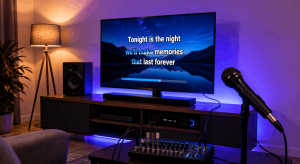
An HDMI karaoke setup changes everything the moment you press play. Lyrics look sharper. Music sounds fuller. Timing feels tighter. Instead of wrestling with cables and mismatched audio, everything suddenly works together like a well-rehearsed band.
Many people overlook HDMI because it feels too simple. One cable. One connection. Yet simplicity is exactly why HDMI works so well for karaoke. It carries high-quality video and audio at the same time, keeping everything in sync. When singers see lyrics clearly and hear music without delay, confidence grows naturally.
If your karaoke nights feel slightly off, HDMI might be the missing piece.
Why an HDMI Karaoke Setup Makes a Difference
Karaoke relies on timing. Lyrics must match music. Sound must match visuals. Any delay breaks immersion.
An HDMI karaoke setup solves this by transmitting digital audio and video together. Unlike older connections, HDMI reduces lag and signal loss. As a result, what you see and what you hear arrive together.
That synchronization matters more than people realize. When lyrics appear exactly on beat, singers relax. When audio sounds clean, voices blend better. The entire experience feels smoother.
In short, HDMI removes friction from karaoke.
Understanding How HDMI Works for Karaoke
HDMI stands for High-Definition Multimedia Interface. It carries both audio and video through a single cable.
In a karaoke context, this means:
- Lyrics display in high resolution
- Music plays in digital quality
- Audio and video stay synchronized
Older setups often split audio and video across multiple cables. That creates complexity and delay. HDMI simplifies the signal path.
When using an HDMI karaoke setup, fewer connections mean fewer problems.
HDMI Karaoke Setup Basics for Beginners
Setting up HDMI for karaoke is easier than it sounds. Most modern devices already support it.
You typically connect:
- A karaoke player, laptop, or media device
- A TV, monitor, or projector
- Optionally, a soundbar or AV receiver
The HDMI cable links the source device to the display or receiver. Audio and video travel together.
Once connected, select the correct HDMI input on your screen. In many cases, that’s all it takes.
Choosing the Right HDMI Cable for Karaoke
Not all HDMI cables are equal. Quality matters, especially for longer runs.
For most karaoke setups, a standard high-speed HDMI cable works well. If you use 4K displays or long cable lengths, choose certified high-speed cables.
Shorter cables reduce signal loss. Avoid extremely cheap options that may cause flicker or dropouts.
A reliable cable ensures your HDMI karaoke setup stays stable throughout the night.
Connecting Karaoke Devices via HDMI
Different devices connect slightly differently, but the principle stays the same.
Laptops connect via HDMI ports or adapters. Karaoke machines often include HDMI outputs. Streaming devices also support HDMI.
Once connected, ensure the device output resolution matches your display. Automatic settings usually work best.
When configured correctly, HDMI delivers crisp lyrics and smooth playback.
Using HDMI with a TV for Karaoke
TVs are the most common display choice. They’re large, bright, and easy to position.
Connect your karaoke device to the TV using HDMI. Select the correct input. Adjust picture settings if needed.
Disable unnecessary image processing like motion smoothing. These features can introduce lag.
With proper settings, an HDMI karaoke setup on a TV feels responsive and immersive.
HDMI Karaoke Setup with a Projector
Projectors add drama. Big lyrics feel like a real stage.
HDMI works well with projectors, but placement matters. Longer cable runs may require higher-quality cables or signal boosters.
Ensure the projector’s input supports the resolution you’re using. Match aspect ratios to avoid stretched lyrics.
Projector-based HDMI karaoke setups shine in larger rooms or outdoor settings.
Routing HDMI Through a Sound System
Many karaoke setups include external audio systems. HDMI supports this easily.
If you use an AV receiver or soundbar, route HDMI through it first. The receiver separates audio for speakers while passing video to the display.
This method centralizes control. Volume, sound modes, and inputs stay organized.
A properly routed HDMI karaoke setup delivers stronger sound without extra cables.
Audio Quality Benefits of HDMI Karaoke Setup
HDMI transmits digital audio formats with minimal loss. That improves clarity.
Music sounds richer. Background tracks feel fuller. Vocals sit more naturally in the mix.
Compared to analog connections, HDMI reduces noise and distortion. Clean audio boosts confidence for singers.
Better sound quality encourages louder participation and longer sessions.
Video Quality Advantages for Karaoke Lyrics
Clear lyrics matter. Blurry text frustrates singers.
HDMI supports high-definition and even 4K video. Lyrics appear sharp and readable from a distance.
Smooth frame rates reduce eye strain. Colors remain consistent.
When lyrics look professional, performances feel more confident.
Reducing Audio Lag in HDMI Karaoke Setup
Lag ruins karaoke. HDMI helps minimize it, but settings matter.
Enable game mode or low-latency mode on TVs. These reduce processing delays.
Avoid routing audio through multiple devices unnecessarily. Keep the signal path short.
Proper settings ensure your HDMI karaoke setup stays responsive.
HDMI Karaoke Setup with Laptops
Laptops are popular karaoke sources. HDMI makes them versatile.
Connect the laptop to a TV or projector. Set display mode to duplicate or extend.
Duplicate mode mirrors lyrics on both screens. Extend mode allows control from the laptop while displaying lyrics separately.
Adjust audio output to ensure sound flows through HDMI.
Laptop-based HDMI karaoke setups offer flexibility and convenience.
Using HDMI with Streaming Karaoke Apps
Streaming karaoke apps rely on stable connections. HDMI supports that stability.
Apps display lyrics in high resolution. Audio streams cleanly through HDMI.
Ensure your internet connection remains stable. HDMI handles output; streaming handles content.
Together, they create seamless karaoke experiences.
Managing Volume Levels in HDMI Karaoke Setup
HDMI carries audio digitally, but volume control still matters.
Adjust volume at the source device first. Then fine-tune at the TV or sound system.
Avoid maxing out any single control. Balanced levels prevent distortion.
Good volume management keeps sound comfortable and clear.
Common HDMI Karaoke Setup Mistakes
Some mistakes appear often:
- Using low-quality cables
- Forgetting to select correct audio output
- Leaving TV processing features enabled
- Overcomplicating signal routing
Avoiding these mistakes keeps karaoke smooth.
Troubleshooting HDMI Karaoke Issues
If sound or video fails, check basics first. Ensure cables are seated properly. Verify input selection.
Restart devices if needed. Update drivers or firmware.
Most HDMI issues resolve quickly when approached methodically.
HDMI Karaoke Setup for Multi-Screen Displays
Some setups use multiple screens. HDMI supports this with splitters or extended displays.
Duplicate lyrics on multiple screens for larger rooms. Ensure splitters support required resolution.
Multi-screen HDMI karaoke setups enhance visibility and engagement.
Combining HDMI with Wireless Microphones
HDMI handles output. Microphones handle input.
Wireless microphones work independently of HDMI. Balance audio levels carefully.
Ensure microphone receivers connect to the sound system, not the TV.
Together, these systems coexist smoothly.
Why HDMI Simplifies Karaoke Setup
Fewer cables mean fewer problems. HDMI combines tasks efficiently.
Simplification reduces setup time. Less troubleshooting keeps focus on fun.
An HDMI karaoke setup feels modern and reliable.
HDMI Karaoke Setup for Parties and Events
Parties demand reliability. HDMI delivers consistency.
Once configured, switching songs stays smooth. Visuals remain sharp. Sound stays synchronized.
Hosts worry less. Guests enjoy more.
That reliability matters in social settings.
Future-Proofing Your Karaoke Setup with HDMI
HDMI continues to evolve. New devices support it universally.
Choosing HDMI ensures compatibility with future TVs, players, and apps.
Future-proof setups save money and frustration later.
Why HDMI Feels More Professional
Professional systems prioritize digital connections. HDMI reflects that approach.
Clean signals, synchronized output, and simplified routing feel polished.
That polish elevates karaoke from casual to impressive.
Conclusion
An HDMI karaoke setup delivers clearer sound, sharper lyrics, and smoother performance by unifying audio and video into one reliable connection. Instead of juggling cables and fighting lag, you gain simplicity and confidence. When lyrics sync perfectly with music and sound fills the room cleanly, singers relax and enjoy the moment. HDMI doesn’t just improve technical quality. It improves the entire karaoke experience, turning ordinary nights into memorable performances.
FAQ
1. Do I need HDMI for karaoke?
No, but HDMI provides better synchronization and quality than older connections.
2. Can HDMI carry karaoke audio and video together?
Yes, HDMI transmits both audio and video through a single cable.
3. Why is there audio lag with HDMI sometimes?
TV processing features can cause lag, which can be reduced by enabling low-latency modes.
4. Does HDMI improve karaoke lyric clarity?
Yes, HDMI supports high-resolution video, making lyrics sharper and easier to read.
5. Can I use HDMI with any karaoke machine?
Most modern karaoke machines and media devices include HDMI outputs for compatibility.