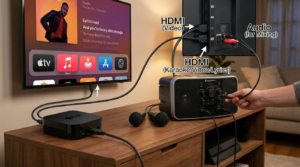
A minimal karaoke setup can turn an ordinary evening into a memorable singing night without complicated equipment. You only need a reliable music source, a clear lyric display, microphones, and suitable sound. Therefore, even a small living room can become an enjoyable karaoke space within minutes.
Simple karaoke also reduces the work required before and after your gathering. Instead of connecting mixers, multiple speakers, and several screens, you can focus on a few dependable devices. This makes the event easier to host, especially when you want a relaxed night with friends.
The goal is not to recreate a professional karaoke bar at home. Instead, focus on clear lyrics, comfortable sound, and easy song selection. When those basics work smoothly, guests can concentrate on singing rather than waiting for technical problems to disappear.
Decide What Your Karaoke Night Really Needs
Start by thinking about the number of people attending. A gathering of four friends requires much less equipment than a party with twenty guests. Moreover, the size of your room affects how powerful your speaker needs to be.
For most small gatherings, one screen and one speaker are enough. A television works well for lyrics because several guests can see it simultaneously. Alternatively, a laptop or tablet can handle both song selection and lyric display in a smaller room.
Your minimal karaoke setup should avoid equipment that does not solve a real problem. You probably do not need a separate mixer if your karaoke speaker already has microphone controls. Likewise, elaborate lighting is unnecessary unless you specifically want a party atmosphere.
Think about how guests will choose songs. Streaming services, karaoke apps, and online karaoke videos can make searching easy. However, confirm that your chosen source provides the features and tracks you need before everyone arrives.
Finally, decide whether you need one or two microphones. One microphone keeps things simple, while two allow duets and group performances. For most social gatherings, two microphones provide greater flexibility without making the system difficult to manage.
Choose One Simple Source for Your Songs
Using several music sources can create unnecessary confusion. Pick one primary device, such as a smartphone, tablet, laptop, or smart television. Then use it throughout the night whenever possible.
A karaoke app can provide organized song searches and on-screen lyrics. However, features and song availability vary between services. Check your preferred application before the event so you understand how playback and song queues work.
YouTube can also provide many karaoke-style backing tracks. Search for instrumental versions with clearly displayed lyrics and check each important song beforehand. Because uploads vary in quality, some tracks may have different arrangements or inaccurate lyrics.
For a minimal karaoke setup, prepare a playlist before guests arrive. Add popular songs, easy singalongs, duets, and several different genres. This reduces the amount of time people spend searching between performances.
Keep a backup source available without building a second complete system. For example, another phone can access songs if the main device encounters trouble. A simple backup gives you reassurance without adding clutter to the room.
Use Your Existing TV as the Lyric Screen
A television is one of the most useful pieces of equipment you probably already own. Its larger screen makes lyrics easier to read from several feet away. Therefore, singers do not need to crowd around a phone or tablet.
Depending on your devices, you may connect through HDMI, compatible casting features, or a karaoke application on the television. Choose whichever method works reliably with your equipment. Test it before the event rather than learning the connection process with guests waiting.
A minimal karaoke setup benefits from placing the TV directly in front of the performance area. Singers should see the words without turning their heads constantly. Meanwhile, guests should still have a clear view from their seats.
Avoid positioning bright decorative lights where they reflect from the screen. Glare can make lyrics difficult to read, especially during faster songs. Soft room lighting usually provides a better balance between atmosphere and visibility.
If you do not have a television available, a laptop can work for smaller gatherings. Place it at eye level when possible. The screen should remain close enough for singers to read without leaning forward throughout every song.
Pick a Speaker That Can Handle Vocals
Your sound system does not need to be large, but it should reproduce both music and microphones clearly. An all-in-one karaoke speaker can simplify everything because it combines several functions. Many models include Bluetooth, microphone inputs, and basic vocal controls.
If you already own compatible audio equipment, determine whether it can accept the signals your karaoke arrangement requires. Regular Bluetooth speakers can handle backing music, but microphone support varies. Therefore, do not assume every wireless speaker can become a complete karaoke system.
The best speaker for a minimal karaoke setup is one that reduces extra connections. Built-in microphone controls are particularly helpful because they remove the need for a separate mixer. Echo or reverb can add some polish, although these effects are optional.
Place the speaker where it can project toward listeners without pointing directly at the microphones. This helps reduce feedback. Also, avoid hiding it inside a cabinet, which can affect sound quality.
Start at moderate volume during your sound check. Raise the music until it fills the room comfortably, then adjust the microphone. Clear vocals matter more than maximum loudness during home karaoke.
Keep Microphone Choices Simple
Wireless microphones make home karaoke feel cleaner because performers can move without dragging cables. They are convenient for duets and group songs as well. However, they need charged batteries and compatible connections.
Wired microphones offer another simple option. They require no wireless pairing and can provide dependable performance when connected directly to suitable equipment. Their main disadvantage is the cable across the performance area.
For a minimal karaoke setup, avoid collecting several microphones unless you genuinely need them. Two microphones usually cover solo performances, duets, and most group activities. Additional singers can join choruses without each person holding a microphone.
Check microphone levels before guests arrive. Sing at normal performance volume rather than quietly speaking during your test. This gives you a more realistic idea of how the vocals will sound.
If you hear feedback, move the singer farther from the speaker first. Then reduce microphone volume slightly if needed. Small placement changes can solve many problems without requiring additional equipment.
Arrange the Room Without Creating a Stage
You do not need to build a physical stage for home karaoke. Instead, clear a small area near the television where one or two people can stand comfortably. Removing unnecessary furniture may provide all the space you need.
Position seating so guests can see both the singers and lyric screen. A loose semicircle often works better than rows of chairs. Moreover, this arrangement makes the evening feel social rather than formal.
Keep your minimal karaoke setup away from busy walkways. Cables should run along walls or other low-traffic areas whenever possible. Drinks and food should also stay away from speakers, chargers, and other electronics.
Leave enough room for singers who naturally move during energetic songs. Even guests who start standing still may begin dancing once they become comfortable. A clear floor reduces the chance of accidental bumps.
Do not overdecorate the room. A few color-changing lights or an LED strip can add atmosphere if you already own them. However, comfortable seating and a clean performance area matter more than elaborate decorations.
Create a Song Queue Before Singing Starts
Long searches between performances can slow down an otherwise lively karaoke night. A simple queue keeps songs moving and gives the next singer time to prepare. You can use a piece of paper, phone note, or built-in queue feature.
Ask each guest to choose a song while another person performs. This prevents everyone from staring at the search screen after every track. In addition, it keeps attention focused on the current singer.
A minimal karaoke setup works especially well with an equally simple hosting system. One person can manage playback while guests add requests to the list. There is no need for complicated scheduling software or dedicated karaoke management equipment.
Keep the queue flexible. Someone may change their mind or decide to join a friend for a duet. Moving names around is better than pressuring someone to perform before they feel ready.
Prepare several backup songs for moments when nobody chooses immediately. Familiar group tracks can restore momentum quickly. Once everyone joins a chorus, volunteers often become easier to find.
Prepare Songs for Different Confidence Levels
A good karaoke night should not depend entirely on strong singers. Include tracks with simple melodies and familiar choruses for beginners. Then add more challenging songs for guests who enjoy showing their vocal range.
Duets are particularly useful for nervous participants. Sharing a song removes some of the attention from one person. Furthermore, friends can help each other when someone misses a lyric or entrance.
Your minimal karaoke setup should support group participation just as easily as solo performances. Choose a few songs that everyone knows and encourage the room to join the chorus. This can make the event feel welcoming from the beginning.
Mix musical styles and decades when your guest list has varied tastes. Pop, rock, country, R&B, and older classics can all earn a place. Variety prevents the playlist from becoming repetitive.
Avoid making every song a difficult power ballad. High notes can become tiring after several performances. Mixing energetic tracks with relaxed songs keeps both singers and listeners more comfortable.
Test Everything Before Guests Arrive
A short equipment test can prevent a long troubleshooting session later. Connect your main playback device, start a karaoke track, and check the lyric display. Then test every microphone you plan to use.
Listen for noticeable audio delay while singing. Wireless connections and television processing can sometimes make timing feel uncomfortable. If this happens, simplify the audio path or try a compatible wired connection.
Test the minimal karaoke setup exactly as guests will use it. Sitting beside the speaker while checking the microphone does not reproduce real performance conditions. Stand in the singing area and read lyrics from the planned distance.
Charge phones, tablets, microphones, and portable speakers before the event. Keep suitable chargers accessible in case the evening lasts longer than expected. Low batteries create interruptions that basic preparation can prevent.
Finally, play several different songs. One successful track does not confirm that your entire playlist works correctly. Testing a few favorites can reveal poor backing tracks or lyric problems before the party starts.
Keep Food, Drinks, and Decorations Easy
Karaoke is the main entertainment, so food does not need to become another major project. Finger foods and easy snacks let guests eat between performances. They also reduce the need for formal seating.
Create a separate area for drinks. Keeping cups away from microphones, speakers, televisions, and power connections protects your equipment. Additionally, guests can find refreshments without crowding the performance area.
A minimal karaoke setup pairs naturally with simple decorations. Color-changing bulbs, a small LED strip, or existing room lighting can create enough atmosphere. You do not need a complicated lighting rig for a casual gathering.
If you want a photo area, use one uncluttered wall. A simple backdrop can provide a recognizable party spot without filling the room with decorations. Reusable items also make cleanup faster.
Keep pathways visible throughout the evening. Dim lighting can create atmosphere, but guests still need to move safely. Make sure stairs, cables, and snack areas remain easy to see.
Have a Simple Backup Plan
Even carefully tested technology can occasionally fail. Your internet connection might become unstable, or a wireless microphone could lose power. A small backup plan keeps these problems from ending the party.
Download supported content beforehand when your chosen service legally provides an offline feature. Otherwise, keep another approved music source available. Remember that offline availability depends on the specific platform and subscription.
For your minimal karaoke setup, a spare compatible cable can be particularly useful. If wireless audio becomes unreliable, a wired connection may restore playback quickly. Keep the cable nearby rather than buried in another room.
Extra microphone batteries can also save the evening when applicable. Rechargeable microphones should start fully charged. If your equipment uses replaceable batteries, keep the correct type available.
Do not build an entire duplicate system for emergencies. The goal is simply to cover the most likely failures. One backup music source, charging options, and a suitable cable may be enough.
Host the Night Without Overcomplicating It
A good host keeps the evening moving without turning karaoke into a strict competition. Start with an easy, recognizable song to show guests that perfection is unnecessary. Your willingness to participate can make hesitant singers more comfortable.
Encourage applause after every performance. Avoid criticizing missed notes or forgotten lyrics, even jokingly, unless you know the singer welcomes that humor. A supportive room creates more volunteers.
Once your minimal karaoke setup is running, resist the urge to adjust it constantly. If everyone can hear the music and microphones clearly, leave the settings alone. Repeated technical changes can interrupt the flow more than small audio imperfections.
Allow short breaks when the room needs them. Background music can continue while guests eat or talk. Then restart karaoke with an energetic group favorite.
Watch the audience rather than following a rigid schedule. Some groups want nonstop performances, while others prefer longer conversations between songs. Flexibility makes the night feel natural.
Conclusion
Planning karaoke does not require professional equipment, elaborate decorations, or hours of technical preparation. A clear lyric screen, suitable speaker, one or two microphones, and an organized music source cover the essentials. Smart room placement can make those simple tools work even better.
A minimal karaoke setup also gives you more time to enjoy your own event. Prepare the playlist, test your connections, charge your equipment, and create a simple song queue beforehand. Once guests arrive, the technology should fade into the background.
Most importantly, focus on participation rather than perfect performances. Give beginners easy options, encourage duets, and keep familiar group songs ready. When the setup is simple and the atmosphere is supportive, karaoke becomes less about equipment and more about sharing a fun night together.
FAQ
1. What equipment do I actually need for a simple karaoke night?
You need a music source, lyric display, suitable speaker, and at least one microphone. A television and all-in-one karaoke speaker can simplify the arrangement further. Additional mixers, lights, and audio equipment are optional for casual home singing.
2. Can I use my television for home karaoke?
Yes, a television can provide an excellent lyric display when used with compatible equipment and services. Depending on your devices, you might connect through HDMI or supported casting features. Test your chosen method before guests arrive.
3. Are wireless microphones better for a small party?
Wireless microphones reduce cable clutter and allow singers to move freely. However, they need charged batteries and reliable connections. Wired models can be simpler when you value dependable operation over movement.
4. How can I prevent long pauses between songs?
Create a song queue and ask guests to choose while another person performs. Keep several familiar group tracks ready for gaps. Background music can also maintain the atmosphere during short transitions.
5. How early should I prepare for karaoke night?
Set up and test your equipment before guests arrive rather than troubleshooting during the event. Check microphones, lyrics, sound levels, batteries, and your internet connection. A short preparation session can prevent most common interruptions.