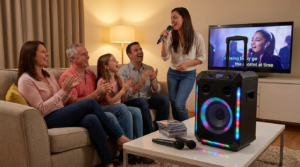
You do not need expensive equipment to enjoy singing at home. Today, you can easily set up karaoke using your smartphone and a few simple accessories. With the right apps and sound setup, any living room can transform into a mini stage.
Many people assume karaoke requires bulky machines and complicated wiring. However, modern smartphones already provide powerful audio and streaming capabilities. Therefore, setup becomes simple, affordable, and flexible.
In this guide, you will learn exactly how to set up karaoke step by step, what equipment works best, and how to optimize sound for a smooth singing experience.
Why Use Your Smartphone for Karaoke
Smartphones offer convenience and portability. Because most people already own one, additional investment stays minimal.
Streaming apps provide instant access to thousands of instrumental tracks. As a result, you can switch songs quickly without CDs or downloads.
When you set up karaoke with your phone, you also gain flexibility. Move the setup from room to room easily. Additionally, you can connect to speakers, TVs, or even wireless microphones without complicated installation.
This approach makes home singing accessible for beginners and casual performers alike.
Step 1: Choose the Right Karaoke App
Your app serves as the core of your system. Therefore, selecting a reliable platform matters.
Look for apps that provide clear lyrics, adjustable pitch control, and large song libraries. Many free apps include ads, while premium versions offer expanded features.
When you set up karaoke, test several apps before your event. This ensures smooth playback and clear lyric timing.
Additionally, check if the app supports Bluetooth speaker output. Seamless connectivity prevents frustrating delays.
Popular App Features to Consider
Some apps include built-in vocal effects like echo and reverb. These features enhance sound slightly.
Others offer recording options. Recording lets you review performances or share clips with friends.
Choose features that match your goals.
Step 2: Connect to a Speaker System
While smartphones have built-in speakers, external audio improves the experience significantly.
Bluetooth speakers offer quick wireless setup. Simply pair your phone and adjust volume levels carefully.
If possible, use speakers with clear bass and balanced treble. Clean sound makes singing more enjoyable.
When you set up karaoke, test volume levels before guests arrive. Avoid distortion by increasing sound gradually.
For larger gatherings, consider powered speakers. They project sound evenly across the room.
Step 3: Add a Microphone
Singing without a microphone feels limiting. Fortunately, many affordable wireless microphones connect directly to smartphones or speakers.
Bluetooth microphones simplify setup. However, wired microphones often provide more stable sound.
When you set up karaoke using a microphone, test feedback levels carefully. Keep the microphone away from speakers to prevent echo noise.
Dual microphones allow duets. If planning a group event, this feature increases participation and fun.
Step 4: Display Lyrics Clearly
Reading lyrics on a small phone screen can feel challenging. Therefore, consider screen mirroring options.
Connect your smartphone to a smart TV using screen sharing or HDMI adapters. Larger displays enhance visibility significantly.
If a TV is unavailable, position the phone securely on a stand at eye level.
When you set up karaoke for multiple guests, clear lyric display improves flow and reduces confusion.
Step 5: Adjust Audio Settings
Balance matters between background music and vocals.
Start by lowering speaker volume slightly. Then increase microphone volume until vocals sit clearly above the music.
If your app includes echo control, apply it sparingly. Too much effect masks pitch clarity.
Testing audio before the party begins ensures a smooth performance experience.
Step 6: Optimize Room Setup
Room arrangement affects sound quality.
Position speakers at ear level and avoid placing them directly against walls. Hard surfaces can create echo.
Arrange seating around a central performance space. This layout encourages participation and creates a stage-like atmosphere.
When you set up karaoke thoughtfully, the environment feels inviting and organized.
Step 7: Create a Song Queue
Avoid interruptions by preparing a simple song list.
Use your app’s playlist feature to organize tracks in advance. Alternatively, allow guests to add songs to a shared note.
Clear organization keeps energy high and reduces awkward pauses.
Structured song rotation ensures everyone has a chance to sing.
Step 8: Manage Volume for Different Times
If hosting late at night, adjust volume carefully.
Many Bluetooth speakers include bass reduction options. Lower bass minimizes noise disturbance.
Additionally, consider headphone-compatible setups for quiet practice.
When you set up karaoke in apartments, respectful sound levels maintain good relationships with neighbors.
Step 9: Troubleshoot Common Issues
Sometimes Bluetooth delay causes audio lag. If this occurs, switch to a wired connection.
If lyrics freeze, restart the app and check internet connection.
Always keep your phone charged or connected to power. Battery loss during performance disrupts the mood.
Planning for minor issues ensures uninterrupted fun.
Budget-Friendly Setup Ideas
You do not need expensive gear to enjoy karaoke.
A basic Bluetooth speaker and microphone often suffice. Many beginners already own compatible devices.
When you set up karaoke on a budget, focus on sound clarity rather than fancy features.
Upgrading later remains possible once you decide to expand your system.
Enhancing the Experience
Lighting enhances atmosphere significantly. Use LED strips or simple lamps to create mood lighting.
Encourage themed dress codes for special occasions. Themes increase engagement and fun.
Additionally, record highlight performances for memory keepsakes.
Small touches transform a simple smartphone setup into a lively event.
Benefits of Smartphone Karaoke
Convenience stands as the biggest advantage. You can set up karaoke almost anywhere within minutes.
Portability allows outdoor use for picnics or small gatherings.
Flexibility also supports solo vocal practice sessions. You can rehearse privately and track improvement over time.
This simple system grows with your needs.
Conclusion
Learning how to set up karaoke using your smartphone opens endless entertainment possibilities. With the right app, speaker, and microphone, you can create a professional-feeling setup easily.
Keep equipment simple, test sound levels carefully, and organize songs in advance.
Whether hosting a party or practicing alone, smartphone karaoke offers flexibility, affordability, and fun.
With thoughtful preparation, your home can become a lively stage anytime you choose.
FAQ
1. Do I need Wi-Fi to use karaoke apps?
Most streaming apps require internet. However, some allow offline downloads for backup use.
2. Can I use wired microphones with my phone?
Yes, but you may need an adapter depending on your phone model.
3. Is Bluetooth delay common?
Sometimes. If audio lag occurs, switching to wired connections often fixes the issue.
4. How loud should I set my speakers?
Start low and increase gradually. Balanced sound prevents distortion and protects hearing.
5. Can I practice singing alone with this setup?
Absolutely. Smartphone karaoke works well for solo rehearsal and skill improvement.