Disclosure: This site may earn a commission from qualifying purchases through links in its guides. This karaoke duet setup guide does not depend on a particular machine or accessory.
A karaoke duet setup is easy to picture: two people sing into two microphones while the track plays. The difficult part is making both voices clear without a loud backing track, a feedback howl, or one singer disappearing whenever the other joins in. You can solve most of that before the first song by tracing the signal path and doing a short sound check.
This guide assumes a home karaoke machine, TV, or small mixer with two microphone inputs. It does not ask you to buy a new system. Start with what you have, identify each control, and make small changes in a repeatable order. The controls vary across products, so use the manual for your exact model when an input or setting has an unfamiliar name. For the larger system decision, see the site’s home karaoke systems guide.
Check what your karaoke duet setup can connect
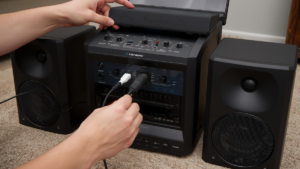
Look at the machine before inviting both singers to the microphone. Find the two mic inputs and confirm their connector types. Some machines have two independent mic sockets and two mic level knobs. Others accept a single wireless receiver that handles two microphones and sends a mixed signal into one input. A third setup may use a small external mixer. These arrangements behave differently during balancing: separate channels let you adjust each singer independently; a single combined feed may require adjustments on the receiver instead.
Write a simple path for each sound: “mic 1 to input 1,” “mic 2 to input 2,” and “song source to music input.” Then trace where the final mix plays: the machine’s built-in speaker, a pair of powered speakers, or a TV audio output. If lyrics appear on a TV but sound comes from a different speaker, confirm that the song and microphones reach the same listening area. If you cannot tell which cable carries what, unplug one source at a time at low volume and label the connections.
Check the battery or charge level on wireless microphones and the receiver. Keep a spare set of appropriate batteries or the supplied charger nearby. Test both microphones separately before testing them together, because a quiet mic can be mistaken for a bad balance when it is actually muted, paired incorrectly, or on the wrong channel.
Place singers and speakers for a clean starting point
Put the main speaker ahead of the singers, pointing toward the audience, rather than directly toward the microphone grilles. Keep both singers far enough from the speaker that they can move naturally without stepping into its path. There is no universal distance that fits every room and product; the goal is to reduce the amount of amplified sound that re-enters an open microphone. Shure explains that speaker and microphone placement, room acoustics, and gain all affect feedback.
Have the singers face the lyric screen without pointing their microphones at the speaker. If the screen is beside the speaker, angle the screen or the singers so they do not have to turn the microphone toward it. Keep the mic a comfortable, consistent distance from each mouth. Moving one mic far away and turning its gain up often makes room sound and feedback more noticeable. The Shure SM58 guide recommends testing microphone placement and keeping unwanted sound sources behind a cardioid microphone; use your own microphone’s guide if its pickup pattern differs.
Do not cup the microphone grille to make a voice sound stronger. Shure notes that covering a directional microphone’s grille can alter its pickup pattern. Instead, move the mic consistently and adjust its level deliberately.
Set the two voices before raising the music
Turn the master volume down. Put echo or reverb at a low starting point. Ask singer one to speak and sing a short phrase at normal performance level while singer two stays quiet. Raise mic 1 until the voice is clear, without making it painfully loud. Repeat for singer two with mic 2. Now ask them to sing the same short line together. If one voice masks the other, change that person’s mic level a little, then repeat. Do not correct an imbalance by increasing every control at once.
If your system has only one combined mic control, change the level on the individual wireless receiver channels if available. If neither the machine nor receiver offers separate control, ask the louder singer to move the mic slightly farther away and the quieter singer to maintain a steady position. This is a practical compromise, not a substitute for independent channels when regular duet use matters to you.
Add the music next. Start the backing track at a moderate level and have both singers perform a verse. Lower the music if words vanish, or lower the microphones if the backing track becomes inaudible when singing starts. Use small changes and listen from the audience position, not only beside the machine. A second person can stand where guests will sit and tell you which part is hard to hear.
Use echo carefully
Echo can make a duet feel fuller, but too much repeats consonants and blurs the words when two voices overlap. Begin nearly dry. Add a little effect after the two voices and the track are already balanced. If the machine offers separate echo and reverb controls, change one at a time while playing the same phrase. The test is whether you can still understand both singers, especially at the end of a line.
Many home machines apply one effect setting to both microphones. That is fine for a casual duet. If the two singers want very different vocal effects, first check whether the machine can route them separately. Avoid promising that an external effect or app will solve this unless its outputs can be connected to your actual system.
Run a short rehearsal and fix one problem at a time
Choose a familiar song with alternating lines and a shared chorus. Let singer one take the first line, singer two take the next, then sing together. This simple rehearsal exposes three common problems: one mic is much louder, the music source is delayed relative to the lyrics, or the system feeds back when both microphones are open. Make a note of which event triggers the problem.
For a squeal or sustained ringing, lower the mic level immediately. Reposition the speaker and microphones, then raise the level again cautiously. A feedback tone is different from a short echo or a buzzing cable. Shure describes feedback as amplified speaker sound repeatedly entering a microphone. If the sound is a steady hum with both mics muted, trace the cable or power path instead of changing speaker placement.
For a lag between the screen and the sound, test the song source alone, then the microphones alone. Note whether the problem appears when a wireless speaker, TV sound mode, or app is used. Try the machine’s direct audio connection if the manual supports it. Keep the adjustment that actually changes the delay, and restore settings that did not help. This prevents a pile of unrelated changes from making the system harder to troubleshoot.
For a voice that cuts in and out, swap the two microphones between singers. If the problem follows one microphone, inspect its battery, mute switch, receiver connection, or cable. If it stays with one singer, check handling and distance from the mouth. This single swap narrows the issue quickly.
Make the handoff easy during the party
Give the microphones simple labels such as “1” and “2” on a removable tag, not tape over the grille. Put each one in a stand or safe place when it is not in use. Before the next duet, check that both are on and that the last singers did not change the levels. For solo songs, mute the unused microphone if the system lets you. Reducing open mics can also make feedback less likely; Shure lists multiple open microphones among feedback contributors.
Keep a tiny setup card near the machine: input names, starting level positions, how to switch songs, and what to lower first if feedback starts. A setup that guests can use without guessing is a better party setup than one that only its owner understands.
Final karaoke duet setup checklist
- Confirm two working microphones and where each signal is adjusted.
- Trace the song source and final speaker path.
- Put the speaker ahead of the singers and away from open mic grilles.
- Balance each singer alone, then together, before raising the track.
- Add echo only after the voices and music are clear.
- Rehearse an alternating verse and a shared chorus.
- Label the controls and keep the unused microphone muted when possible.
A good home duet does not need complicated equipment. It needs two working signal paths, sensible placement, and a sound check that changes one thing at a time. Once both singers can hear themselves and the audience can understand their words, save those settings and enjoy the song.