Living in a tiny apartment, dorm room, or compact shared space doesn’t mean you have to give up on karaoke nights. USB karaoke setups make it incredibly easy to enjoy singing without bulky equipment or complicated technology. With just a microphone and a USB port, you can transform any corner of your home into a fun, music-filled mini-stage.
If you’d like more ways to maximize entertainment in tight areas, explore our small-space audio tips at /compact-audio-guide or check out /diy-home-music-setups for creative ideas.
Why USB Karaoke Is a Game-Changer for Small Living
USB karaoke systems have become popular for a reason. They eliminate the clutter and frustration often associated with traditional machines. Instead of dealing with tangled cables, oversized speakers, or multi-piece hardware, you simply plug in a mic and start singing. Because everything is compact, it fits your lifestyle without crowding your space.
For reliable karaoke tracks, you can also browse Sing King (https://www.youtube.com/@SingKingKaraoke) or KaraFun’s YouTube channel (https://www.youtube.com/@KaraFun).
What Is a USB Karaoke Setup?
A USB karaoke setup uses a USB microphone connected to your laptop, tablet, gaming console, or smart TV. The system is intentionally simple, making karaoke accessible even for people who aren’t tech-savvy.
How It Works
• Plug a USB microphone into your device
• Open a karaoke track on YouTube or inside an app
• Start singing—no advanced configuration required
Because the setup is so lightweight, you won’t need:
• Large speakers
• Complicated software
• Professional knowledge
Why USB Karaoke Is Perfect for Small Spaces
USB karaoke systems offer several benefits that make them ideal for compact rooms:
• They save space: Every component fits inside a single drawer.
• They’re affordable: Many USB microphones cost less than a night out.
• They limit sound spill: Smaller speakers keep noise from traveling.
• They’re fast to set up: You can be singing in under a minute.
Essential USB Karaoke Gear (You Don’t Need Much!)
USB Microphone
A good vocal USB microphone should offer:
- Plug-and-play convenience
- Built-in echo or volume controls
- A sturdy, compact build
Popular options include the Fifine K669B, TONOR TC30, and the BONAOK Wireless USB Mic.
Playback Device
Your laptop or smart TV works perfectly. If needed, your phone can also handle the job with the right adapter.
Optional: External Speaker
Although your laptop speakers might be good enough, a small Bluetooth speaker can add a bit more power.
Karaoke Sources
Free choices:
- YouTube
- Sing King
- Karaoke Version (https://www.karaoke-version.com)
Paid apps:
- KaraFun
- Singa
- Smule
3 Simple USB Karaoke Setups for Small Spaces
1. The Solo Setup
USB mic + laptop + YouTube playlist
Perfect for late-night jam sessions where you don’t want to disturb anyone.
2. The Portable Party Kit
Wireless USB mic + smartphone/tablet + karaoke app + Bluetooth speaker
Great for pop-up gatherings or shared living spaces.
3. The Pro-Feel Setup
USB/XLR mic + USB mixer + compact powered speaker
Ideal if you want more control or plan to record your vocals.
Tips for Creating a Killer Small-Space Karaoke Zone
Improve Acoustics
To reduce echo, add pillows, blankets, or curtains around your singing space. Soft materials help absorb sound, and singing toward them improves clarity.
Set the Mood
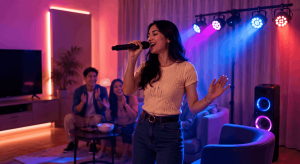
You can elevate the experience with LED strips, fairy lights, or a clip-on spotlight. Using a phone tripod also makes recording easier if you want music-video-style clips.
Create a Playlist
Before you begin, save a list of karaoke tracks so you don’t waste time searching between songs.
Common Mistakes to Avoid
Ignoring Latency
Audio delays can ruin your performance. To avoid lag, use wired headphones or adjust audio settings inside your software.
Cranking the Volume Too High
In a small room, loud volume can cause distortion. Keeping things moderate ensures better sound and happier neighbors.
Choosing the Wrong USB Mic
Since some USB mics are made for podcasting rather than singing, always pick one designed for vocals.
Can You Duet with a USB Setup?
Definitely. You can:
- Use a USB splitter
- Connect through a USB mixer
- Or simply alternate singers during the performance
Want to Record Your Singing?
Recording is easy with:
- OBS Studio
- Smule’s recording features
- Your phone paired with a USB mic
Because you can watch playback instantly, you’ll improve faster and have plenty of laughs along the way.
Add-Ons to Elevate Your Setup
- USB ring light for better video
- Foldable mic stand for hands-free singing
- Curtain or bedsheet backdrop for a clean stage look
These simple additions make your setup feel more polished without taking up room.
Great for All Ages and Tech Levels
USB karaoke works for everyone—kids, grandparents, roommates, or solo singers. Since setup takes seconds, even non-technical users can enjoy a seamless experience.
Best Places to Set Up in Small Homes
- Closet Studio: Excellent acoustics and privacy.
- Bedroom Stage: Your nightstand becomes a mic stand.
- Kitchen Concert: Tile surfaces create exciting sound reflections.
Final Thoughts
USB karaoke setups prove that you don’t need a large space or expensive gear to have a great time. They’re compact, user-friendly, and budget-friendly, making them perfect for spontaneous singing sessions in any home. Whether you’re venting after a long day or hosting a tiny get-together, your next performance is just one USB port away.
FAQs
Can I use a USB mic with my phone?
Yes. You’ll just need a Lightning or USB-C adapter depending on your device.
What’s the best free source for karaoke songs?
YouTube offers thousands of karaoke tracks. Simply search “song title + karaoke.”
Do USB karaoke setups require an app?
Not necessarily. You can use YouTube or any website with karaoke tracks.
Can I connect two USB mics?
Yes. A USB hub or mixer will allow multiple microphones.
Is a USB setup good for recording songs?
Absolutely. Many USB mics deliver excellent home-studio results.