There’s nothing quite like the thrill of hitting that perfect note. However, a muddy mix or unexpected feedback can quickly sour the experience. If you’re looking to improve karaoke sound quality at home, understanding a few key techniques and leveraging modern technology can make a world of difference. Furthermore, with technological advancements like AI-powered vocal tuning expected to be incorporated into many karaoke platforms, achieving professional-grade audio at home is more accessible than ever. BestKaraokeMachine.net is here to help you sound your absolute best.
The Foundation: Your Microphone and Speakers
Your core equipment plays a crucial role in overall sound quality. Investing in quality components and understanding their nuances is the first step. Moreover, proper setup ensures a solid base for your vocal performance.
1. Microphone Selection and Technique
- Type Matters: Dynamic microphones are robust and great for home use. Conversely, condenser mics offer more sensitivity for nuanced vocals, though they are more prone to feedback.
- Wired versus Wireless: Wireless microphones offer freedom of movement, popular with many portable systems. Nevertheless, ensure good battery life and strong signal strength. Wired mics generally provide a more stable connection and often superior sound fidelity.
- Holding It Right: Hold the microphone 1–2 inches from your mouth. Specifically, avoid cupping the grille, as this can cause feedback and muffle your voice. This simple adjustment significantly enhances vocal clarity.
2. Speaker Placement and Power
- External Speakers: While many portable, all-in-one systems have decent built-in speakers, external speakers often provide superior clarity and volume. Position them to the sides or slightly in front of the singers, not directly behind. This prevents feedback.
- Power: Ensure your speakers have enough wattage to fill your space without distortion. If your karaoke machine has a dedicated amplifier or mixer, utilize it to boost and refine the audio. Proper power distribution is essential for clear sound.
Fine-Tuning Your Audio to Improve Karaoke Sound Quality
Once your hardware is set, fine-tuning the audio is where you truly improve karaoke sound quality. Adjusting settings can transform a good performance into a great one.
1. Understanding Equalization (EQ)
An equalizer allows you to adjust the balance of different frequency ranges (bass, mid, treble) in your audio. Most karaoke machines or connected apps offer basic EQ controls. Learning to use these effectively can make your voice sound much better.
- Bass (Low Frequencies): Add a little for warmth and depth. However, too much can make vocals muddy and indistinct.
- Mids (Mid-Range Frequencies): This is where most vocal clarity resides. Adjust carefully to make your voice cut through the music without sounding harsh.
- Treble (High Frequencies): Boost for brightness and crispness. Conversely, excessive treble can sound hissy or piercing. Finding the right balance is key.
2. Reverb and Echo Effects
These effects can add a professional polish to your vocals. However, moderation is key to avoid overdoing it.
- Reverb: Simulates singing in a larger space, adding richness. A slight amount can make your voice sound fuller and more natural.
- Echo: Creates repeating sounds. Use sparingly; too much can make lyrics unintelligible. Generally, echo is best for specific stylistic choices rather than constant use.
Optimizing Your Environment for Better Sound
Beyond your equipment, your physical space significantly impacts how your karaoke sounds. Even the best gear can struggle in a poorly optimized room. Therefore, consider these environmental factors.
Acoustics and Room Setup
Hard surfaces reflect sound, causing echoes and muddiness. Soft furnishings absorb sound, which can greatly enhance vocal clarity. For instance, consider adding rugs, curtains, or upholstered furniture to your karaoke area. These items help dampen reflections and create a more controlled listening environment. Furthermore, strategic placement of these items can make a noticeable difference in how your voice is perceived.
Minimizing Background Noise
External noise can interfere with your performance. Close windows and doors to block out street sounds. Additionally, turn off or lower the volume of other appliances like fans or air conditioners if possible. A quiet environment allows your voice to be heard more clearly, letting you truly improve karaoke sound quality without distractions. Consequently, your audience will appreciate the improved clarity.
Advanced Tips for Professional-Grade Karaoke Audio
For those serious about their home karaoke setup, a few advanced techniques can elevate your sound even further. These methods often involve additional equipment but yield significant improvements.
Using a Mixer and Compressor
A dedicated audio mixer provides more precise control over individual microphone levels, music volume, and effects. This allows you to blend your vocals seamlessly with the backing track. Moreover, a compressor can help even out vocal dynamics, making quiet parts louder and loud parts softer. This results in a more consistent and polished sound, helping you to truly enhance your karaoke experience. For more insights on selecting the right equipment, explore our rankings for those who want to buy the best karaoke machine.
Feedback Suppression
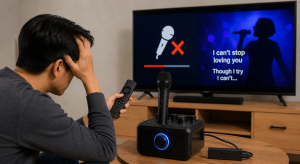
Feedback occurs when sound from your speakers re-enters your microphone, creating a loud, piercing squeal. This is a common issue that can ruin a performance. To combat this, ensure microphones are not pointed directly at speakers. Additionally, some mixers and karaoke machines include built-in feedback suppression technology. These systems automatically detect and reduce problematic frequencies. You can also experiment with microphone gain levels; lowering the gain can prevent feedback without significantly reducing vocal volume. Understanding these techniques is vital to improve karaoke sound quality effectively.
Software and App Enhancements
Modern karaoke often involves apps and software, which offer their own set of tools to refine your sound. These digital solutions are becoming increasingly sophisticated.
Digital EQ and Effects
Many karaoke apps now include advanced digital equalizers and effects. Take time to explore these settings. You might find presets optimized for different vocal styles or room acoustics. Experiment with various reverb and delay settings to find what complements your voice best. Some apps also offer vocal enhancement features, which can subtly refine your pitch and tone. These digital tools provide flexibility and convenience, allowing you to fine-tune your sound without needing external hardware.
Vocal Harmony and Pitch Correction
Some premium karaoke software offers real-time vocal harmony generation. This can add lush backing vocals to your solo performance. Furthermore, pitch correction technology can gently nudge your notes into tune, providing a subtle but effective safety net. While not a substitute for practice, these features can boost confidence and make your performance sound more professional. Learning to utilize these features can significantly improve karaoke sound quality for any singer.
Maintaining Your Equipment for Optimal Performance
Regular maintenance ensures your karaoke system continues to deliver excellent sound. Neglecting your equipment can lead to degradation in audio quality over time.
Cleaning Microphones and Speakers
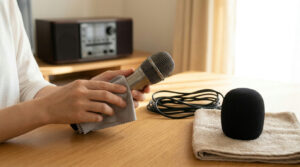
Microphones can accumulate grime and moisture, which affects sound clarity. Regularly wipe down your microphone grilles with a clean, dry cloth. For speakers, keep them free of dust. Dust can impede airflow and affect driver performance. A clean system performs better and lasts longer.
Cable Management and Connection Checks
Loose or damaged cables are a common source of crackling, hums, and signal loss. Periodically check all cables for wear and tear. Ensure connections are snug and secure. Using high-quality cables can also make a difference in signal integrity. Proper cable management also prevents accidental disconnections and keeps your setup tidy. This attention to detail contributes to a consistent and clear audio experience. For further assistance or questions, please contact our website.
Practice Makes Perfect: Improving Your Vocal Technique
While equipment and settings are crucial, your own vocal technique is paramount. No amount of technology can fully compensate for poor singing habits. Therefore, focus on your craft.
Breathing and Posture
Proper breathing from your diaphragm provides the power and control needed for strong vocals. Practice good posture: stand tall with relaxed shoulders. This allows your lungs to expand fully, giving you more breath support. Better breath control leads to more sustained notes and a richer tone.
Vocal Warm-ups and Hydration
Just like any athlete, singers need to warm up their vocal cords. Simple exercises like humming, lip trills, and scales prepare your voice for singing. Additionally, staying hydrated by drinking plenty of water keeps your vocal cords lubricated. This prevents strain and helps maintain vocal health, ensuring you can consistently improve karaoke sound quality with your own voice.
Conclusion
Achieving excellent karaoke sound quality at home is an attainable goal. By focusing on quality equipment, understanding EQ and effects, optimizing your environment, and honing your vocal technique, you can transform your karaoke sessions. Remember, it’s a combination of technology and personal effort that creates truly memorable performances. Whether you’re a seasoned singer or just starting, these tips will help you sound your absolute best. For more tips and product recommendations, visit BestKaraokeMachine.net’s blog.
FAQ
How can I reduce microphone feedback during karaoke?
To reduce microphone feedback, ensure your microphones are not pointed directly at your speakers. Also, try to position speakers slightly in front of or to the sides of the singers. Lowering the microphone gain can also help. Some mixers offer built-in feedback suppression features.
What’s the difference between reverb and echo for vocals?
Reverb simulates the natural reflections of sound in a space, making your voice sound fuller and richer, like singing in a large hall. Echo creates distinct, repeating sounds of your voice. Reverb is generally used subtly for ambience, while echo is a more pronounced effect.
Are wireless microphones better than wired ones for home karaoke?
Wireless microphones offer freedom of movement, which is great for energetic performances. However, wired microphones often provide a more stable connection and can sometimes offer superior sound quality without concerns about battery life or signal interference. Your choice depends on your priorities for mobility versus consistent audio fidelity.
How important is room acoustics for vocal clarity?
Room acoustics are very important for vocal clarity. Hard surfaces reflect sound, causing echoes and muddiness. Soft furnishings like rugs, curtains, and upholstered furniture absorb sound, which significantly reduces reflections and improves the overall clarity of your vocals. Optimizing your room can make a big difference.
Can I use my regular home stereo speakers for karaoke?
You can use regular home stereo speakers for karaoke, but be mindful of their power handling. Karaoke often involves loud vocals and music, which can potentially damage speakers not designed for such output. Dedicated PA (Public Address) speakers or karaoke-specific speakers are often more robust and better suited for the task, providing a better listening experience.
What is a good starting point for EQ settings on vocals?
A good starting point for vocal EQ is to slightly boost the mid-range frequencies (around 1-4 kHz) to enhance clarity. You might add a small amount of bass for warmth (around 100-200 Hz) and a touch of treble for brightness (around 8-10 kHz). However, always adjust by ear to suit your voice and the room acoustics.