This karaoke machine buying guide starts with four checks: your audience, song source, microphone connections and lyrics display. Compare those needs with the exact model’s manual before looking at extra effects or lights. For home parties, kids or venue use, the right setup is the one you can connect and operate comfortably within your complete budget.
What to Look for in a Karaoke Machine Buying Guide
We use a practical comparison framework: price, sound quality, singing features and connectivity. Define what each criterion means for your room and guests. A feature list is useful only when it answers a real requirement. Keep the model number and official manual beside your notes so similar product names do not lead to the wrong specifications.
Power Output (Wattage) Explained
Read the manufacturer’s power description carefully and compare like measurements. Do not use one advertised wattage as a promise of clarity, room coverage or suitable listening volume. If two listings describe power differently, ask for the actual specifications rather than deciding that the larger number is better. A listening comparison in your intended setup can answer a different question from the electrical rating.
Connectivity Options: The Digital Hub of Your System
Modern karaoke systems offer a variety of ways to connect to your music sources and external devices.
- Music input: Confirm how your chosen playback device connects and which formats the model supports.
- Lyrics display: Check the actual video or screen route; audio playback alone is not the complete display setup.
- USB function: Read whether the specific port supports files, recording, charging or another documented use.
- Online features: Verify service access, network requirements and subscriptions for the functions you want.
Microphone Types: Your Voice, Amplified
Check the supplied microphones and the machine’s supported inputs. Decide whether you need a solo microphone or a duet setup, and confirm that any additional model can work with the exact receiver or input. Do not assume a plug adapter supplies compatibility or that a wireless microphone from another bundle will pair with your machine.
- Wired setup: Match the microphone and cable to the documented input.
- Wireless setup: Confirm receiver compatibility, charging or batteries, and simultaneous microphone support.
- Microphone choice: Use the model’s stated requirements rather than assuming every microphone type is compatible.
- Duets: Check whether both singers have the controls and connections you need.
Speaker Quality and Portability Considerations
Speaker descriptions are a starting point for a comparison, not a guarantee of sound quality. If you can try the equipment, use a familiar backing track and a comfortable level, then listen with a microphone connected. For portability, compare stated dimensions and weight, carrying arrangements and the manufacturer’s battery conditions. Check whether the quoted weight includes accessories you will also carry.
Key Features to Consider in Your Karaoke Machine Selection
Beyond the core components, several features can enhance your karaoke experience. Understanding these will help tailor your choice to your specific needs.
Sound Effects and Voice Enhancement
Check which effects the exact model provides and how they are controlled. Echo or reverb changes the sound of your voice; it does not establish professional singing ability. Begin with a modest setting when trying the equipment so you can judge the voice and music balance. A long effects list is less useful if the controls are difficult for your intended singers to operate.
Recording Capabilities
If recording matters to you, confirm what the model actually saves: the microphone, backing track or both. Check the storage method, file format and playback instructions in the manual. A USB port alone does not prove recording support. Think about where recordings will be kept and who should have access before sharing a family or party performance.
Screen and Display Options
Decide where singers will read lyrics. A built-in screen, tablet and television require different arrangements. Check viewing position and the documented connection for the actual song source. An audio connection does not automatically send a picture. Try a song change and a lyrics display before the party so you know which device supplies the words and which produces the sound.
Song Library and Streaming Services
Choose the song source before selecting the machine. Check the app or service’s supported devices, current access terms and any subscription needed for the features you intend to use. Ordinary music playback is not automatically a karaoke version with suitable lyrics. If you need offline singing, verify the exact download or file support rather than assuming a wireless connection will always be available.
Durability and Build Quality
Inspect the carrying handle, controls, microphone connections and storage requirements. Follow the manufacturer’s stated use conditions. A sturdy-looking shell is not a verified drop or spill rating, and a portable product is not automatically weather resistant. Check the warranty and seller’s return arrangements so you understand what happens if the machine does not fit your setup.
Choosing the Right Karaoke Machine for Different Users
Your ideal karaoke machine depends largely on who will be using it and how. Let’s explore options for various user types.
For Beginners and Casual Home Use
For an occasional home singalong, list the smallest set of functions that completes your evening: a song source, readable lyrics, usable microphones and clear controls. Check what is already included and what you must add. A simpler setup can be an appropriate candidate when it meets those requirements; simplicity alone is not a guarantee that every model works for every family.
For Aspiring Singers and Vocal Enthusiasts
For regular practice, decide whether you need recording, independent microphone controls or a particular external microphone. Confirm those connections rather than buying a system solely because it is described as professional. If you can try it, listen to a familiar voice and track under comparable settings. Keep observed results separate from manufacturer specifications and from an untested reviewer’s opinion.
For Party Hosts and Entertainers
For hosting, check whether the system accepts the number of microphones you need and whether changing songs interrupts the controls your guests use. Plan the display, cable routes and room position. If the gathering is larger than a living-room session, get setup advice appropriate to the actual space instead of assuming one power rating predicts coverage.
For Kids and Family Fun
For children, check the manufacturer’s stated age guidance, controls and supervision instructions. Keep cables and stands out of busy routes and have an adult manage levels and setup. A colorful design does not certify hearing safety or resistance to damage. Choose features your family can operate without relying on unsupported claims that the product develops confidence or guarantees safe listening.
Understanding the Price Range for a Quality Karaoke Machine
Set a total budget that includes the machine, any required microphone, display connection and song-service access. Compare complete packages at the time you shop. A low advertised unit price can exclude accessories, while a higher-priced bundle may include items you do not need. This guide supplies no current price range or claim that one price tier guarantees better performance.
Building an Entry-Level Setup
For an entry-level budget, prioritize a documented working connection and the controls you will actually use. Confirm what comes in the box and calculate missing accessories separately. Avoid treating a budget label as a fixed specification: microphone support, playback formats and screen arrangements need to be checked model by model.
Deciding Which Extra Features Matter
If you have more room in your budget, compare the additional features with a stated need. A second microphone input or a clearer display arrangement may matter more to your party than an extra light effect. Do not assume a more expensive category guarantees stronger speakers or better construction without the actual model evidence.
Planning a Venue or External System
For a venue or complex external setup, write down the existing mixer, microphones and display before comparing machines. Ask for the documented signal connections and any required accessories. A professional label does not establish compatibility or performance. Keep the system design and the seller’s stated specifications distinct from an unsupported promise of top-tier results.
Installation and Setup Tips for Your New Karaoke Machine
Before your first singing session, follow the exact model’s connection sequence and identify the separate music and microphone controls. Keep the manual accessible. A short setup check can show whether a cable or song source is missing while there is still time to fix it.
Connecting to Your TV or Monitor
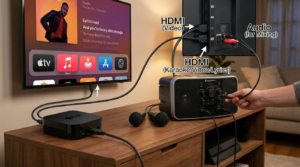
Follow the machine and display manuals for the connection you intend to use. Select the documented input on the television, and verify that the chosen source supplies lyrics as well as music. HDMI, USB and Bluetooth labels alone do not establish every supported function. Test the exact combination rather than assuming another product’s instructions apply.
Microphone Placement and Usage
Shure’s feedback guide explains the microphone-to-loudspeaker loop and the role of placement and level settings. Use those principles when trying your setup. Avoid pointing a microphone into the speaker, and check the documented microphone controls before turning up the whole system to solve a balance problem.
Optimizing Sound Settings
Start with modest effects while checking the voice and backing track. Change one setting at a time so you can identify what caused a difference. NIDCD’s hearing information explains why loudness and exposure duration matter. The listening information here is general education, not medical advice; a wattage label does not establish a safe listening level.
Troubleshooting Common Issues
For no sound, check the selected source, mute settings, documented connection and separate microphone control. For lyrics problems, check the actual display route and song-service support. Follow the manual rather than repeatedly adding adapters or raising levels. If the equipment behaves unexpectedly, stop the test and seek the manufacturer’s guidance instead of improvising a power or wiring change.
The Final Word on Your Karaoke Machine Buying Guide
Use this karaoke machine buying guide to create a short, explainable shortlist. For each candidate, record the audience, complete cost, actual connections and required song source. Confirm uncertain details with the official manual or manufacturer. Once the setup fits your room and singers, you can spend more time choosing songs and less time guessing which accessory is missing.
FAQ
What are the most important features to look for in a home karaoke system?
Start with your song source, readable lyrics, required microphone count and controls your household can use. Compare the exact connections and included accessories. If you can listen before buying, use a familiar song at a comfortable level and keep effects modest so you can judge the basic balance.
How much should I expect to spend on a decent singing machine?
Calculate the complete package using current seller prices, accessories and song-service costs. This guide does not give a universal price band. A higher price does not by itself prove better sound, durability or compatibility with your existing devices.
Can I connect my smartphone to any karaoke player?
Check the exact model and phone connection in the manufacturer’s instructions. Confirm whether that route carries music, lyrics or both. A wireless feature name does not guarantee support for every app or playback function.
What is the difference between wired and wireless microphones for a karaoke setup?
A wired microphone needs a suitable input and cable route. A wireless microphone needs its compatible receiver and documented power arrangement. Choose around your space and movement needs, then verify the actual equipment rather than treating either category as universally better.
Are there specific brands known for producing reliable karaoke equipment?
Compare individual models using their original manuals and disclosed specifications. A familiar brand name does not establish the reliability of every model or replace a documented test. Read warranty and return terms alongside the features that matter to your intended singers.
How can I make my singing machine sound better in my living room?
Review placement, separate voice and music controls, and the manufacturer’s instructions. Shure’s cited guide provides feedback context. Make one change at a time and keep listening levels comfortable; a larger amplifier or extra effect is not an automatic solution to a setup problem.