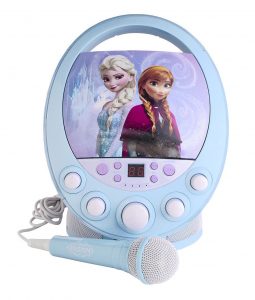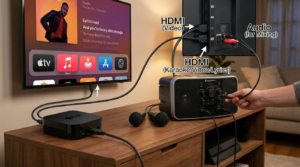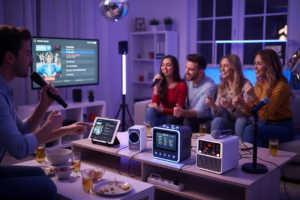
The best karaoke machines for kids are the ones whose age guidance, controls, song access and microphone arrangement fit your family. Start with the youngest intended user, then check who chooses the music and whether children will sing alone or together. This guide compares documented product examples and practical buying checks; it does not report hands-on durability tests.
Choose for the children who will actually use it
A colorful speaker is easy to spot in a shop. Deciding who will operate it takes more thought. Write down the youngest child’s age, whether an adult will choose every song, and where the machine will live. A preschool playroom, a shared family television and an older child’s bedroom create different requirements. Avoid choosing solely for a future stage of development when the present controls or accessories are unsuitable.
Use package warnings and manufacturer age guidance as your starting point. The CPSC — Toy Safety advises choosing toys with the child’s age, abilities and interests in mind. A toy microphone should not be assumed suitable for every younger sibling simply because it looks small. Check the actual product labeling and keep the adult setup tasks separate from the child’s singing controls.
For mixed ages, consider two routines rather than asking one device to do everything. Younger children might prefer a familiar built-in song with an adult nearby. Older singers might want to choose tracks on a family tablet. You can assess whether those routines fit one machine before paying for features nobody will use.
Three documented examples to compare
These are comparison candidates, not a performance ranking. Their manufacturer pages establish features and age guidance; they do not establish that one sounds better or survives more drops. Availability, accessories and regional versions can change, so confirm the exact model on the seller’s listing.
VTech Kidi Superstar Jr. for an early-years routine
The VTech — Kidi Superstar Jr. manufacturer page gives an age range of three to five and describes built-in songs and voice effects. That makes it a concrete example to investigate when you want a child-oriented singing activity instead of a separate speaker, mixer and television arrangement. Read the current instructions before deciding what a child can operate independently.
Ask whether the built-in song selection suits your household. Check how to start, stop and adjust playback. If external music matters, confirm the source device and connection instructions rather than assuming every phone app works in the same way. The useful buying question is whether an adult can prepare the session without leaving unfamiliar controls for a young singer to manage.
VTech Kidi Super Star for a more varied activity
The VTech — Kidi Super Star page identifies an age range of four to ten and describes singing activities and recording features. It is an example for families considering more than a simple microphone toy. Read the feature list with your child and choose the activities they actually want to try, rather than treating a longer specification sheet as better value.
Recording deserves a household rule of its own. Agree who may record, who can replay a clip and whether anything will be shared. If siblings prefer different songs, establish a turn-taking plan before starting. Those practical details belong in your choice alongside the product’s controls and music source.
VTech Kidi Star Karaoke Remix for older children
The VTech — Kidi Star Karaoke Remix page lists an age range of five to ten and describes a music mixer and external music connection. Investigate it when an older child wants to experiment with music controls as well as sing. Check the connection method against the device you already own and verify which accessories are included in your region.
Do not assume the stand, microphone or controls will suit every child just because the published age range overlaps. If possible, inspect the product dimensions and instructions together. Decide where the stand would go and whether there is room to move around without pulling on the connection cables.
Compare sound without inventing a laboratory score
If a retailer offers a demonstration, bring a familiar song and ask to hear speech as well as singing at a comfortable level. Listen for whether the words are easy to follow. Ask which voice effects are enabled so you can hear the microphone without heavy processing. This is a way to assess a candidate for your room, not a claim that we measured its output.
Microphone and music controls should be understandable to the adult handling setup. Ask how to turn the backing track down when a quieter singer starts. Confirm whether the machine supports one microphone or more, and whether any extra microphone must be bought separately. A photograph showing two people singing does not establish two simultaneous microphone inputs.
Durability means checking evidence, not guessing from appearance
No drop-test results are supplied for these examples. Treat phrases such as rugged, child-friendly and durable as questions to investigate. Check the warranty terms, replacement microphone availability, power connection and cleaning instructions. A carrying handle can make transport convenient without proving impact resistance or waterproofing.
For your own routine, choose a storage spot before buying. Will the microphone have a place of its own? Can cables be put away without tangling? Is the machine easy for an adult to lift? Keep food and drinks in a separate area and follow the maker’s care guidance. Do not intentionally drop or wet electronics to test a marketing claim.
Work out the complete cost
Compare the package you would actually need, not just the speaker’s listed price. Note microphones, batteries, power adapter, music source, connecting cables and any optional song service. A lower-priced base unit may still require accessories for your planned session. Conversely, a feature-rich package may include controls your family never intends to use.
Make a simple comparison sheet with four columns: total purchase cost, sound controls, singing features and connectivity. Add a note for unresolved questions rather than awarding a score from an incomplete listing. If the seller cannot explain whether a cable or adapter is included, resolve that before checkout.
Set up the first family session
Choose a short playlist with a song for each participant. Put the screen where everyone can see it without standing around the speaker. Have the adult test the connections first, then show children the small set of controls they will use. A planned handover is easier to manage than changing the setup during every chorus.
For example, one sibling could choose the song while another holds the microphone, then swap roles after the track ends. Someone who does not want to sing can help select the next song or join a chorus. Keep recording optional and let children decline a solo without turning the session into a competition.
Start quietly and take breaks. The NIDCD — Noise-Induced Hearing Loss explains that loud sound exposure can damage hearing. This is general equipment and listening guidance, not medical advice; stop if sound is uncomfortable and seek qualified help for persistent hearing concerns. Avoid treating a child’s enthusiasm as a reason to keep raising the speaker level.
Questions parents often ask
Does Bluetooth mean lyrics will appear on the television?
Check the manual for the exact audio and screen arrangement. A Bluetooth music connection does not by itself establish a built-in lyric display or television output. Decide whether lyrics stay on a phone, tablet or another screen before buying the machine.
Should we choose wireless microphones?
Compare the complete setup: charging, batteries, pairing and replacement options as well as freedom of movement. A wired microphone may suit a seated singing corner; a wireless setup may suit another room. Neither description establishes sound quality or safe placement by itself.
How do we choose between these examples?
Start with manufacturer age guidance, then match the activities, music source and controls to your household. Leave unverified sound or durability questions open until you can inspect documentation or hear a demonstration. The most useful choice is a machine you can set up, store and share comfortably with the children who will use it.