Are you ready to bring the joy of karaoke into your home but feel overwhelmed by technical jargon? Understanding karaoke machine components is the first step to choosing a setup that fits your needs. At BestKaraokeMachine.net, we believe informed choices lead to better experiences, so we aim to provide clear, practical information to help you navigate your purchase with confidence.
Affiliate disclosure: Some links in this guide may be affiliate links — if you buy through them, we may earn a commission at no extra cost to you.
Let’s break down the core elements that make up a functional karaoke system, so you know exactly what you’re looking for.
The Heart of the Party: Main Unit & Player
Every karaoke machine needs a central unit to manage the music and vocals. This often combines several functions:
- Media Player: This is where your music comes from. It could be a CD+G player (for traditional karaoke discs), a USB port for MP3+G files, an SD card slot, or Bluetooth/Wi-Fi connectivity for streaming from apps like YouTube or dedicated karaoke platforms. Many newer players prioritize this kind of versatile connectivity.
- Amplifier: The amplifier boosts the audio signal from your music and microphones so it can be heard through speakers. Its power output, measured in watts, is one factor in how loud and clear the result sounds — check the manufacturer’s own published wattage spec for the exact model you’re considering rather than relying on a general rule of thumb, since audio power ratings are measured differently across brands.
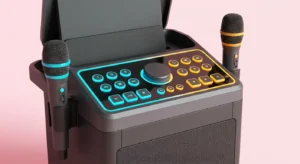
- Mixer: This component lets you balance the volume of your music with the volume of your microphones. More advanced mixers offer controls for echo, reverb, and even pitch correction.
Your Voice, Amplified: Microphones
No karaoke party is complete without microphones. Understanding the types available will help you compare models:
- Dynamic Microphones: These are common and durable, suited to general use and handling loud input. They don’t require external power, which is part of why they’re a typical choice for home karaoke setups — see this overview of dynamic and condenser microphone design.
- Condenser Microphones: Often found in recording studios, these can offer higher sensitivity and capture more nuanced vocal detail. They typically require phantom power (supplied by a mixer or dedicated power source) and are generally more fragile than dynamic mics.
- Wireless Microphones: These use radio frequencies (UHF or VHF) or Bluetooth to connect to the main unit, offering freedom of movement for performers who like to move around.
When evaluating microphones, consider their pickup pattern (for example, cardioid for more focused pickup, omnidirectional for broader pickup) and how that affects vocal clarity in a given room. For instance, a cardioid mic can help isolate a singer’s voice on a noisier stage. Many modern systems include portable karaoke systems under $100 that come with basic wired or wireless microphones, making them reasonable entry-level options.
Bringing the Sound to Life: Speakers
Speakers convert electrical signals into audible sound waves, and speaker quality meaningfully affects the overall karaoke experience. Different types of speakers suit different needs:
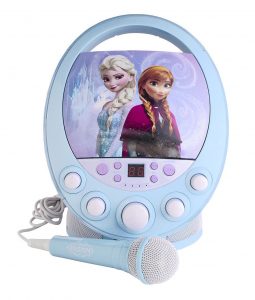
- Built-in Speakers: Many all-in-one karaoke machines include integrated speakers, which are convenient for casual home use and are common in budget karaoke machines designed for home parties. Their sound quality is generally more limited than external options.
- External Speakers: For fuller sound, connecting to external speakers is often worthwhile. These can range from powered PA (public address) speakers to home stereo systems or soundbars. PA speakers are designed for live performance and are suited to larger rooms or outdoor events.
- Monitor Speakers: Sometimes used by performers, monitor speakers face the singer so they can hear their own vocals clearly over the music, which can help with pitch and confidence.
When selecting speakers, consider wattage, frequency response, and impedance as published by the manufacturer. Higher wattage generally supports louder sound, while a wider documented frequency response tends to reproduce more of the low and high end accurately. The speaker’s impedance should match the amplifier’s rated output — check both spec sheets, since mismatches can affect performance and, in some cases, damage equipment.
Visual Appeal: Screens and Displays
Seeing the lyrics is fundamental to karaoke. Modern systems offer several display options:
- Built-in Screens: Some compact karaoke machines feature small, integrated screens, which suit portability and are common in systems designed for kids or travel.
- External Monitor Connectivity: Most karaoke machines can connect to external TVs, monitors, or projectors via HDMI, RCA, or sometimes VGA cables, giving a larger, clearer display for group karaoke.
- Tablet/Smartphone Integration: Increasingly, systems use apps on tablets or smartphones for lyric display, offering flexible access to online libraries. If you’re experiencing Chromecast karaoke problems, understanding your display connection is a good place to start troubleshooting.
The clarity and size of your display affects how enjoyable the experience is for a group, so a good quality screen or reliable connectivity is worth prioritizing.
The Brains Behind the Music: Software and Content
Software and content delivery are core karaoke machine components that determine what you can sing and how easily you can access it.
- CD+G Discs: The traditional format — CD+G (Compact Disc + Graphics) discs contain audio tracks with embedded lyrics. They’re still available, though their popularity has declined with digital alternatives.
- Digital Files (MP3+G, MP4): USB drives and SD cards can store digital karaoke files, offering a more compact library than physical discs.
- Streaming Services: Many modern karaoke machines integrate with or allow streaming from services like YouTube or dedicated karaoke apps, which can provide a much larger song selection, though sometimes Spotify karaoke sync problems require troubleshooting.
- Karaoke Apps: Dedicated apps, often on smart devices or smart TVs, offer curated song libraries, vocal effects, and sometimes recording capabilities, usually through a subscription.
The right content delivery method depends on your budget, desired song variety, and technical comfort level.
Connectivity Options: Linking It All Together
Connectivity lets the different parts of your system communicate:
- HDMI: The standard for connecting to modern TVs and monitors, carrying both audio and video signals.
- RCA (Red, White, Yellow): Older but still common; these cables carry analog audio and composite video signals, and many legacy systems and TVs still use them.
- Bluetooth: Convenient for wireless audio streaming from smartphones or tablets, reducing cable clutter.
- Wi-Fi: Enables streaming from online sources, app integration, and sometimes firmware updates on smart karaoke systems.
- USB Ports: Used for playing digital files from flash drives, charging devices, or connecting to a computer for recording or updates.
- Auxiliary (Aux) Input/Output: A standard 3.5mm or 1/4-inch jack for connecting external audio sources or outputting audio to headphones or external speakers.
Understanding these connections helps you integrate your karaoke machine with your existing home entertainment system — for instance, a stable Wi-Fi connection helps avoid Fire Stick karaoke problems when streaming.
Optional Enhancements for a Fuller Experience
Beyond the core karaoke machine components, a few optional additions can round out a karaoke setup:
- Vocal Effects Processors: Beyond basic echo and reverb, dedicated vocal effects units can add harmonies, pitch correction, and other effects that can noticeably change how a performance sounds.
- Lighting Systems: Affordable karaoke party lights and decor add atmosphere — disco balls, LED strips, and strobe lights are popular, low-cost choices.
- Recording Functionality: Some machines let you record performances to USB drives or internal storage, useful for practice or sharing with friends.
- Songbooks and Tablet Stands: A physical songbook or a tablet stand can make the experience smoother by freeing up your hands.
These enhancements let you customize your setup beyond the basic components.
Choosing Your Karaoke Setup
Selecting the right karaoke machine components depends on your needs, budget, and how you plan to use the system. Consider these factors:
- Portability vs. Stationary: Do you need a system you can easily move, or will it stay in one place? Minimal karaoke setups tend to be more portable.
- Audience Size: For small family gatherings, a compact all-in-one may suffice. For larger parties, more powerful speakers and multiple microphones matter more.
- Content Access: Do you prefer physical discs, digital files, or streaming? Your preference will dictate the type of media player you need.
- Budget: Karaoke systems range widely in price; check current retailer listings since pricing and promotions shift often. Higher-end systems often offer better sound quality and more features, but that’s not guaranteed across every model.
- Ease of Use: Beginners may prefer a simple plug-and-play system, while more experienced users might want extensive controls.
By weighing these factors against manufacturer specs rather than marketing language, you can choose components that are likely to suit your actual use case.
Conclusion
Understanding the various karaoke machine components helps you make a more confident purchase, whether you’re buying your first system or upgrading an existing one. From the central unit that handles music and amplification to the microphones that capture your voice and the speakers that project your performance, each part plays a role — and we’ve covered media players, amplifiers, mixers, microphones, speakers, display options, content delivery methods, and connectivity. Optional enhancements like vocal effects and lighting can round out the experience further. Compare manufacturer specs against your actual needs rather than marketing claims, and you’ll be well-equipped to select a system that suits your space, budget, and singing goals.
For more technical background on audio components, reputable audio engineering publications like Sound On Sound or ProSoundWeb offer in-depth, independently written explainers.
FAQ Section
What are the essential parts of a karaoke setup?
The essential parts typically include a main unit (with a media player, amplifier, and mixer), microphones, and speakers. A screen for displaying lyrics is also fundamental for most setups.
How do I connect my karaoke system to a TV?
Most modern karaoke systems connect to a TV using an HDMI cable for both audio and video. Older systems might use RCA cables (red, white, and yellow) instead.
Can I use my own speakers with a karaoke machine?
Many karaoke machines allow you to connect external speakers via RCA, Aux, or sometimes Bluetooth, which is often worthwhile for better sound quality, especially for larger gatherings — check your unit’s manual for supported connections.
What’s the difference between dynamic and condenser microphones?
Dynamic microphones are generally robust and suited to general use, handling loud input without external power. Condenser microphones tend to offer higher sensitivity, often require phantom power, and are commonly used for more controlled, detailed vocal capture.
How do modern systems access songs?
Modern systems access songs through digital files on USB drives, streaming from platforms like YouTube or dedicated karaoke apps via Wi-Fi or Bluetooth, and in some cases still support traditional CD+G discs.