Affiliate disclosure: if this guide to karaoke machine vs karaoke speaker setups contains marked affiliate links, the publisher may earn a commission from qualifying purchases at no extra cost to you. We compare categories and published specifications; we have not tested every product.
Karaoke machine vs karaoke speaker: what’s the difference?
The short answer to karaoke machine vs karaoke speaker: a karaoke machine is usually built around showing lyrics and handling the song source, while a karaoke speaker is a speaker first, with microphone inputs and vocal controls added. Both can run a good night of singing. The right choice depends on where your songs and lyrics come from, how many people will sing and whether the gear needs to move around.
This guide compares the two categories, not specific models. Before you look at any product, list the devices you already own: TV, phone or tablet, laptop and any speaker. That list often answers the question for you.
What a karaoke machine includes
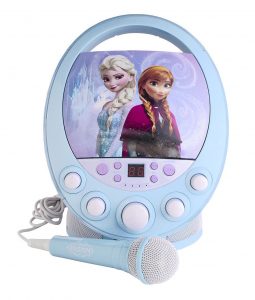
“Karaoke machine” covers a wide range of products, so always read the product page and current manual. In general, products sold under this label tend to focus on running the whole karaoke session in one unit.
Common parts
- A built-in speaker that plays music and vocals together.
- One or more microphones, wired or wireless, often included in the box.
- Vocal controls such as separate microphone volume and echo.
- A way to show lyrics: some units have a built-in screen or a tablet holder, while others send video to a TV.
- Song source options, which may include Bluetooth from a phone, USB, an app or a video connection.
The key strength is that everything is designed to work together. The trade-off is that the built-in speaker and screen are fixed, so you cannot easily upgrade one part.
For a plain-language tour of the parts, see our karaoke machine components guide.
What a karaoke speaker includes
A karaoke speaker, often sold as a party speaker with a microphone input, starts from the speaker side.
Common parts
- A larger speaker cabinet, sometimes with a carry handle or wheels.
- Microphone inputs, and sometimes included microphones.
- Basic vocal controls such as mic volume and echo.
- Bluetooth audio for music from a phone or tablet, and sometimes wired inputs.
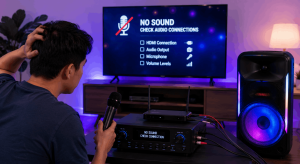
Most karaoke speakers do not show lyrics themselves. You usually display lyrics on a phone, tablet or TV, while the speaker handles the sound. That split can be flexible, but it means you have two signal paths to manage: the picture and the sound.
Our guide to portable karaoke mic speakers covers this style in more detail.
Screens, lyrics and song sources
This is where the two categories differ most in daily use. Trace the signal: where does the song come from, where do the lyrics appear and where does the sound come out?
With a karaoke machine
- Lyrics may appear on a built-in screen, a tablet in a holder or a TV connected by cable.
- The song may come from an app, a phone over Bluetooth or a USB drive, depending on the model.
- Because the machine handles both picture and sound, there are fewer devices to line up.
With a karaoke speaker
- Lyrics usually play from a video on a phone, tablet, laptop or smart TV.
- The music is sent to the speaker, often over Bluetooth.
- If the lyrics and music come through different paths, they can drift apart in timing. Our article on syncing karaoke lyrics explains how to check this.
If you already have a smart TV and like singing to lyric videos, a speaker may slot into that setup. If you want one box that handles lyrics without a TV, a machine with its own screen or tablet holder may be simpler. Check our guide to connecting a karaoke machine to a TV before you decide.
Sound and portability differences
Published specifications can help you compare, but they cannot tell you how a unit will sound in your room. Treat them as a starting point.
Sound
- Karaoke speakers are often built around a larger speaker cabinet, which suits bigger rooms or outdoor gatherings. Check the maker’s stated use rather than assuming.
- Karaoke machines range from compact units for small rooms to larger systems. Some balance size against a built-in screen.
- Both depend heavily on placement and microphone technique. Our tips on improving karaoke sound quality at home apply to either style.
Portability
- Check the weight, handle and power source. Some units run on a built-in battery, others need mains power.
- If you plan to move between rooms or take the setup to a friend’s house, consider how many separate devices you need to carry.
- A machine with its own screen may mean fewer extra devices; a speaker may rely on a phone or tablet you already carry.
Our comparison of portable vs fixed karaoke systems goes deeper on this choice.
Placement and feedback with either setup
Whichever category you choose, the speaker and the microphones share a room, and that is where squealing feedback can start. Microphone maker Shure’s guide to controlling feedback in a sound system notes that placing a microphone directly in front of a loudspeaker significantly increases the likelihood of feedback. It suggests moving loudspeakers farther from microphones, keeping mics pointed away from speakers and turning off microphones that are not in use.
In practice, that means thinking about where singers will stand before you decide where the unit goes. An all-in-one machine sitting right in front of the singers and a tall speaker beside them create different layouts, so plan the room as well as the product.
Microphones and number of singers
Count how many people will sing at once. Duets and group songs need at least two microphones, and some households want more.
- Check how many microphones are included and how many the unit can use at the same time.
- Check whether the microphones are wired or wireless, and how wireless mics are powered.
- Look for separate volume control for each microphone if several people sing together.
Our wired vs wireless karaoke microphone guide explains the trade-offs.
Which suits your home?
Use these questions to narrow the choice. They are a guide, not a rule, and your existing equipment matters most.
A karaoke machine may suit you if
- You want lyrics and sound handled by one unit.
- You do not want to rely on a TV for every session.
- Children or occasional users will run it, and fewer devices means fewer steps.
A karaoke speaker may suit you if
- You already sing along to lyric videos on a smart TV or tablet.
- You want a speaker that also plays music at gatherings when nobody is singing.
- You host in larger rooms or outdoors and the maker states the speaker suits that use.
You may not need either if
A working TV, a speaker with a microphone input and a microphone may already cover your needs. Before buying, try a short rehearsal with what you own. A setup that already works does not need replacing.
Before you buy: a quick checklist
- List the devices you own and their inputs and outputs.
- Decide where lyrics will appear.
- Count the singers who will use microphones at the same time.
- Check the power source and weight against where you will use it.
- Confirm the product exists on the maker’s current page and read its manual.
- Read the return terms before you order.
For buying advice beyond this category comparison, see our karaoke machine for home buying guide.
FAQs
Karaoke machine vs karaoke speaker: which is louder?
It depends on the product, not the label. Compare the maker’s stated room size and use, and remember that louder is not always better in a home.
Can a karaoke speaker show lyrics?
Most do not show lyrics themselves. You usually use a phone, tablet or TV for lyrics while the speaker plays the sound.
Do I need a TV for a karaoke machine?
Not always. Some machines have a screen or tablet holder. Others are designed to send lyrics to a TV. Check the product page.
Can I use my own microphone?
Many units have a microphone input, but connector types vary. Check the input label and the manual before buying a separate mic.
Start by writing down where your lyrics will come from. That one answer usually points you to the right category.
Best Karaoke Machine Editorial